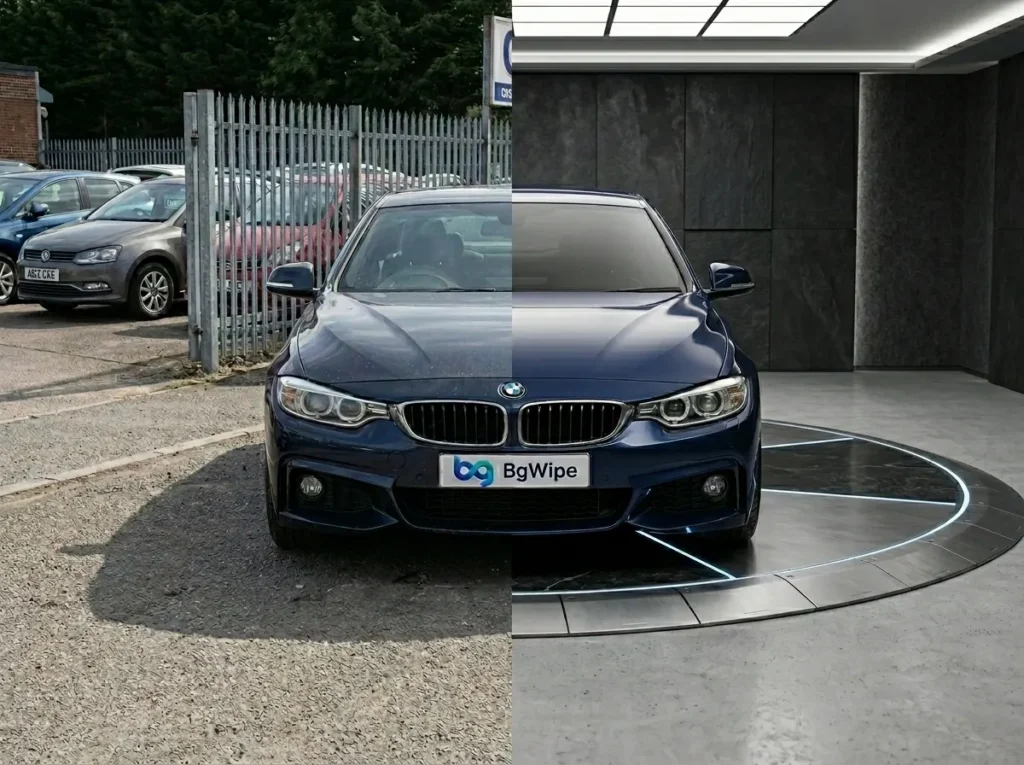
Car retouching is a critical step in automotive retail photography. For used car dealerships, independent sellers, and online marketplaces, the quality of vehicle images directly affects buyer engagement and listing performance. This guide covers what car retouching involves, why it matters, the techniques professionals use, and how AI-powered tools are replacing slow manual workflows. Whether you rely on traditional photo editing software or an automated automotive retouching platform, understanding the full process helps you make better decisions about your image editing workflow.
What Is Car Retouching?
Car retouching is the specialized post-processing of vehicle photographs to enhance, clean, and polish images for commercial use. It includes correcting paint color, removing background distractions, eliminating reflections, adjusting shadows, and ensuring visual consistency across an inventory. This work is traditionally done in Adobe Lightroom and Photoshop, where professional retouching can take 45 minutes or more per image. For dealerships managing large inventories, car image editing services and AI-powered platforms now offer a faster, scalable alternative.
Why Car Retouching Matters for Businesses in Automotive Industry?
Image quality is not a cosmetic concern. It directly impacts how buyers perceive your inventory and your business.
1. First Impressions are Visual
Online car shoppers spend only a few seconds on a listing before deciding to engage or scroll past. Dull paint, cluttered backgrounds, or visible windshield glare can push a potential buyer to the next option.
2. Consistency Builds Trust
When every vehicle in your inventory is retouched to the same standard, it signals professionalism. Inconsistent image quality creates doubt about the business itself.
3. Faster Inventory Turnover
Vehicles with high-quality, retouched images generate more clicks, more inquiries, and shorter time-on-lot.
4. Marketplace Compliance
Many online automotive marketplaces require clean backgrounds, no visible license plates, and standardized angles. Car retouching helps meet those standards without reshooting.
Best Ways of Automotive Retouching
There are various methods for automotive retouching. However, the best way depends on your inventory volume, budget, and quality expectations. BgWipe, is the solution for all your requirements.
We have mentioned the best ways to retouch your automotive inventory visuals below:
1. Manual Editing with Professional Software
Tools like Adobe Photoshop and Lightroom offer granular, pixel-level control. The trade-off is time and cost, especially at scale.
2. Outsourced Car Photo Editing Services
Specialized car image editing services handle bulk orders, removing the need for in-house expertise but introducing turnaround delays and recurring per-image costs.
3. AI-powered Automotive Retouching Tools
AI platforms like BgWipe, automate tasks like background replacement, reflection correction, and shadow generation in seconds. BgWipe is the best solution for dealers to showcase their every car in the lot into a virtual car showroom.
4. Hybrid workflows
Some businesses combine AI tools for bulk processing with manual touch-ups for premium or featured listings.
Basic Manual vs. AI Car Retouching Techniques
Understanding the difference between traditional manual editing and AI-powered retouching helps you decide which approach fits your dealership’s volume, budget, and quality standards.
| Aspect | Manual Car Retouching | AI-Powered Car Retouching |
| Color & Exposure | Requires manual adjustment of curves, hue/saturation, and selective color tools for each image individually | Automatically detects and corrects color balance, exposure, and paint vibrancy across batch uploads in seconds |
| Light & Shadow | Editors manually dodge and burn each image to accentuate curves and body lines | AI generates realistic, directional shadows and optimizes lighting automatically after background replacement |
| Blemish & Dust Removal | Time-intensive cleanup using Clone Stamp, Content-Aware Fill, and frequency separation per image | AI identifies and removes dust, spots, and surface imperfections across the entire inventory without manual intervention |
| Background Replacement | Requires precise masking, selection, and manual compositing with a new backdrop for each photo | One-click background replacement with studio-quality, dealership-ready templates applied consistently to every image |
| Reflection & Glare Removal | One of the most difficult manual tasks, requiring patch tools and careful clone stamping on windshields, chrome, and glossy surfaces | AI detection automatically identifies and removes reflections and glare across all glass and glossy surfaces |
| Number Plate Masking | Manual blurring or overlay placement on each image individually | Automatic license plate detection and masking applied across the full inventory in a single batch |
| Window Tinting | Requires careful selection and manual opacity adjustments per window, per image | AI standardizes window tint appearance across all inventory photos automatically |
| Consistency | Varies by editor skill, fatigue, and workload; difficult to maintain across large inventories | Uniform output quality across every image regardless of inventory size |
| Skill Requirement | Requires professional-level Photoshop and Lightroom expertise | No photo editing expertise needed; upload and download workflow |
| Time Per Image | 45 minutes or more for a full professional retouch | Seconds per image with AI automation |
| Scalability | Not practical for dealerships with 100+ vehicles without a dedicated editing team | Built for high-volume processing; scales to thousands of images without additional cost or time |
| Cost | $2 to $15+ per image | A few cents per image. |
Top 6 Automotive Photo Editing Software for Car Retouching
Choosing the right platform can define your listing quality and editing efficiency. These tools are built specifically for automotive retail.
1. BgWipe
BgWipe offers AI-powered background replacement, reflection removal, shadow generation, number plate masking, and window tinting in a single platform purpose-built for used car dealerships.
Pros
- All five core dealership retouching features in one platform
- Seconds-per-image processing speed
- No Photoshop skills required
- Batch processing for large inventories
- Flat subscription pricing with no per-image cost
Cons
- Focused exclusively on automotive use cases, not a general-purpose photo editor
2. CarCutter
CarCutter provides automated background replacement and vehicle image standardization designed for automotive retail and online marketplace listings.
Pros
- Strong AI backgrounding quality
- QA retouching team that manually reviews images
- Good marketplace integration
Cons
- Primarily focused on background replacement
- Lacks built-in reflection removal, shadow generation, license plate blur, and window tinting that BgWipe offers in a single workflow
3. Spyne
Spyne delivers AI-driven car photo editing with background swaps, image enhancement, and 360-degree spin creation for dealership inventories.
Pros
- 360-degree spin and video tour capabilities
- Mobile app for on-lot capture
- Broad dealership merchandising suite
Cons
- Retouching module is part of a larger ecosystem rather than a dedicated streamlined editing tool
- Does not offer standalone window tinting or dedicated reflection removal as individual features
4. Impel AI (formerly SpinCar)
Impel focuses on interactive vehicle imagery, including 360-degree spins, interior walkthroughs, and visual merchandising for automotive retail.
Pros
- Industry leader in interactive 360-degree vehicle experiences
- Strong OEM and large dealer group adoption
Cons
- Primarily a visual merchandising and engagement platform, not a dedicated photo retouching tool
- Does not offer background replacement, reflection removal, shadow generation, or number plate masking as standalone editing features
5. AutoBackground
AutoBackground specializes in automated background replacement for vehicle photos, offering dealership-ready templates and batch processing.
Pros
- Simple, single-purpose tool for background swaps
- Ready-made dealership templates
Cons
- Limited to background replacement only
- No reflection removal, shadow generation, number plate masking, or window tinting
- Requires additional tools to complete a full retouching workflow
6. Digi5 Studios
Digi5 Studios is a dedicated automobile photo retouching service offering manual and semi-automated editing for dealerships, including background cleanup, color correction, and image enhancement.
Pros
- Human editors handle complex or custom retouching requests
- Suitable for premium or one-off projects
Cons
- Service-based model with per-image pricing and turnaround delays
- Not scalable for dealerships processing hundreds of images weekly without significant cost increases
For dealerships processing large inventories, BgWipe stands out as the most complete automotive retouching platform. It is the only tool on this list that combines background replacement, reflection removal, shadow generation, number plate masking, and window tinting in a single automated workflow with flat subscription pricing and seconds-per-image turnaround.
Why You Should Retouch Car Images With BgWipe?
BgWipe was built specifically for used car businesses. It focuses on the exact retouching tasks dealerships need, automated through AI to complete in seconds instead of the 45-plus minutes a manual workflow demands per image.
BgWipe Car Retouching Features
- Background Replacement: Dealers can remove the original environment and replace it with a clean, professional backdrop. This is the single most impactful retouching step for listing quality.
- Number Plate Masking: With BgWipe you can automatically detect and obscure license plates, helping dealerships meet privacy regulations and marketplace standards.
- Reflection Removal: BgWipe’s reflection or glare removal feature addresses glare and environmental reflections on windshields, windows, and glossy body surfaces through AI detection.
- Shadow Generation: With BgWipe, you can add natural-looking shadows beneath the vehicle after background replacement, keeping the final image grounded and realistic.
- Window Tinting: Dealers can standardise window tint appearance across inventory photos for visual consistency.
How BgWipe Car Retouching Software Works?
You can visit BgWipe AI-powered tool to try all its PhotoRoom features.
- Upload Car Inventory Images: Upload vehicle photos to the BgWipe platform.
- Let the Magic Happen: The AI processes each image, applying selected retouching tasks automatically.
- Showcase Your Best Digital Inventory: Studio quality visuals generated by BgWipe are now ready for listings. You can update your entire inventory across multiple channels in one click.
Conclusion
Car retouching is a baseline requirement for used car businesses selling online. The method you choose, whether manual editing, outsourced services, or AI automation, should match your inventory volume and quality standards. For dealerships looking to automate their retouching workflow without sacrificing quality, BgWipe offers a purpose-built solution. Learn more and try retouching your car’s at BgWipe PhotoRoom.