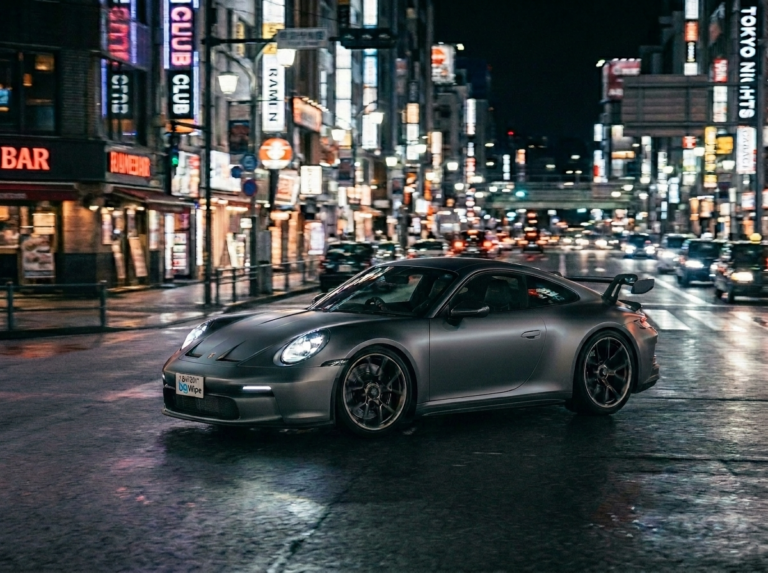

Protecting your privacy online is no longer optional, it’s essential. Whether you’re selling a car online, sharing photos on social media, or posting content featuring vehicles, blurring license plates is a critical privacy measure that prevents criminals and bad actors from accessing your personal information. In this comprehensive guide, we’ll walk you through everything you need to know about how to blur license plates, why it matters, and how BgWipe makes the entire process incredibly simple.
Why You May Need to Blur License Plates?
Before diving into the “how,” it’s important to understand the “why.” License plates contain sensitive information that can be exploited in multiple ways:
1. Privacy Protection and Identity Theft
Your license plate is directly linked to your vehicle registration, which is connected to your address, full name, and other personal details. In the wrong hands, this information becomes a gateway for identity theft, targeted harassment, or stalking. When you post photos online without blurring license plates, whether on Instagram, Facebook, Pinterest, or your personal blog, you’re essentially broadcasting your location and personal information to potentially millions of people.
2. Preventing Unauthorized Tracking
Criminals use license plate information to track vehicle owners for burglary, carjacking, or worse. By sharing a photo of your car online, you’re giving someone the exact information they need to identify your vehicle in parking lots or on the street. This is particularly concerning for high-value vehicles or luxury cars that are frequently targeted.
3. Compliance with Privacy Laws
Many jurisdictions have implemented strict privacy regulations like GDPR (General Data Protection Regulation) in Europe, CCPA (California Consumer Privacy Act) in the US, and similar laws worldwide. If you’re running an e-commerce site, automotive website, or publishing photos professionally, you may be legally required to blur license plates in your images. Failure to do so can result in significant fines and legal consequences.
4. Professional Requirements
If you’re a real estate agent, automotive photographer, or e-commerce seller, blurring license plates is a professional standard. Real estate listings, car sales photos, and property documentation often require license plate obscuring to protect the privacy of car owners, tenants, or neighbors.
5. Social Media Safety
Every time you post a photo with a visible license plate on social media, you’re creating a permanent digital record. This photo can be downloaded, shared, and archived by countless users, many with malicious intent. Search engines also index these images, making them discoverable through reverse image searches.
How to Blur License Plates in BgWipe?
BgWipe is an intelligent, AI-powered photo editing tool that simplifies the license plate blurring process to just a few clicks. Unlike traditional photo editing software that requires extensive training and technical skills, BgWipe solutions are designed for everyone, photographers, content creators, business owners, and everyday users alike.
Step-by-Step Process
Step 1: Upload Your Image
Start by visiting BgWipe’s platform and selecting the photo you want to edit. The interface is intuitive and straightforward, simply drag and drop your image into the designated area, or click to browse your device. BgWipe supports all common image formats including JPG, PNG, WebP, and more.
Step 2: Automatic License Plate Detection
Once you’ve uploaded your image, BgWipe’s advanced AI technology automatically scans the photo and detects any license plates present. This is one of BgWipe’s most powerful features, you don’t need to manually identify or select the license plates yourself. The AI handles the heavy lifting, finding even partially visible or angled number plates with impressive accuracy.
Step 3: Customize Your Blur Settings
After BgWipe identifies the license plates, you have full control over how they’re blurred. You can:
- Adjust Blur Intensity: Choose how strong the blur effect should be. A subtle blur might suffice for casual social media posting, while a heavy blur works better for professional or legal contexts.
- Modify Blur Size and Shape: Not all license plates are the same size or orientation. BgWipe lets you resize and reposition the blur area to perfectly fit the plate, whether it’s standard-sized, custom, or angled.
- Choose Blur Type: Select between standard blur, pixelation, or solid color overlays based on your preference and use case.
Step 4: Preview and Fine-Tune
Take a moment to preview your edited image. If the blur doesn’t look quite right, you can easily adjust the settings. BgWipe’s interactive editor makes it simple to fine-tune every aspect of the blur without starting over.
Step 5: Download Your Image
Once you’re satisfied with the result, simply click “Download” or “Export.” BgWipe maintains the original image quality while applying your blur edits seamlessly. Your image is ready to share on social media, publish on your website, or use for any other purpose.
Top 9 Features of BgWipe Number Plate Blur
BgWipe offers several standout features that make it the go-to choice for license plate blurring:
1. AI-Powered Automatic Detection
The core strength of BgWipe is its intelligent AI that automatically identifies license plates in images. Whether you’re processing a single photo or a batch of hundreds, the AI works consistently and accurately, saving you hours of manual work. This is especially valuable for businesses handling large volumes of photos daily.
2. Lightning-Fast Processing
Speed matters, especially when you’re working with multiple images. BgWipe is optimized for performance, processing images quickly without sacrificing quality. You get your edited photos back in seconds, not minutes.
3. Batch Processing Capability
Have multiple photos that need license plate blurring? BgWipe’s batch processing feature lets you upload multiple images at once and apply the blur to all of them simultaneously. This is a game-changer for e-commerce businesses, automotive dealers, and photography studios managing large image libraries.
4. User-Friendly Interface
You don’t need to be a Photoshop expert to use BgWipe. The platform is designed with simplicity in mind. Even if you’ve never edited a photo before, you’ll find the interface intuitive and easy to navigate. All tools are accessible from a single dashboard.
5. Precise Manual Editing Tools
While the AI handles automatic detection, sometimes you need more control. BgWipe includes manual editing tools that let you:
- Draw custom blur areas
- Adjust existing blur zones
- Add blur to multiple areas in a single image
- Remove blur if needed
6. Multiple Blur Styles
Different situations call for different approaches. BgWipe offers:
- Gaussian Blur: A smooth, natural-looking blur that’s ideal for most uses
- Pixelation: A blocky, stylized blur often used on social media
- Black Box: A solid color overlay for maximum obfuscation
- Custom Opacity: Control how transparent or opaque the blur is
7. No Quality Loss
BgWipe preserves your original image quality while applying edits. You’re not getting a compressed or degraded version of your photo, just your original image with the license plate hidden.
8. Cloud-Based, No Installation Required
BgWipe is a web-based tool, which means there’s nothing to download or install. Open it in any modern web browser on any device, desktop, tablet, or smartphone, and you’re ready to go.
9. Privacy-Focused Processing
Your images are your business. BgWipe processes photos securely and doesn’t store them on their servers longer than necessary. Once you download your edited image, the temporary copy is deleted.
Extensive Toolkit for Editing
Beyond license plate blurring, BgWipe offers a comprehensive set of photo editing tools that make it a one-stop solution for all your image editing needs:
1. Face Detection and Blurring
Just like with license plates, BgWipe can automatically detect and blur faces in photos. This is perfect for protecting the privacy of people in background shots, blurring bystanders in street photography, or obscuring faces on security camera footage.
2. Custom Shape and Freehand Drawing
Use the drawing tools to create custom blur areas. Whether you need to blur a specific region or draw around an irregular shape, the freehand and shape tools give you complete flexibility.
3. Color Adjustment Tools
Enhance your photos with brightness, contrast, saturation, and temperature controls. Perfect for fine-tuning images after applying blur effects.
4. Cropping and Rotation
Adjust framing and orientation before or after blurring license plates. BgWipe includes straightforward cropping and rotation tools.
5. Text and Watermark Addition
Add text overlays or watermarks to your images. Useful for branding, copyright information, or disclaimers.
6. Filter and Effects Library
Choose from various preset filters to enhance your photos. From vintage looks to professional color grading, BgWipe’s effects library has options for every style.
7. Resize and Quality Settings Optimize
image dimensions and compression levels for different platforms. Whether you’re preparing images for web, print, or social media, BgWipe lets you adjust these parameters.
8. Undo and Redo Functionality
Make changes with confidence. BgWipe’s unlimited undo/redo ensures you can experiment freely without worry.
Why Should You Use BgWipe for Blurring?
With several tools available for blurring license plates, from Photoshop to online alternatives, why choose BgWipe PhotoRoom? Here are the compelling reasons:
1. Superior AI Accuracy
BgWipe’s machine learning model has been trained on thousands of license plates from different countries, angles, lighting conditions, and sizes. This means it detects plates with higher accuracy than most competitors, even in challenging scenarios like photos taken at an angle or in poor lighting.
2. Unmatched Speed and Efficiency
Time is money. BgWipe processes images faster than traditional desktop software like Photoshop, and more reliably than generic online blur tools. Batch processing multiple images takes minutes instead of hours.
3. Affordable and Accessible
Whether you need occasional photo editing or regular batch processing, BgWipe offers pricing that works for everyone. There are free tiers for basic use, affordable subscription options for regular users, and enterprise plans for businesses with high-volume needs. No expensive software licenses required.
4. No Learning Curve
Photoshop and GIMP are powerful but notoriously difficult to learn. BgWipe is designed for users of all skill levels. If you can click a button and drag a slider, you can use BgWipe.
5. All-in-One Solution
Instead of juggling multiple tools for different editing tasks, BgWipe handles most of your photo editing needs in one place. License plate blurring, face blurring, background removal, color correction, it’s all here.
6. Dedicated Support
BgWipe offers customer support to help if you run into any issues or have questions. Unlike many free online tools that disappear overnight, BgWipe is a stable, well-maintained platform.
7. Regular Updates and Improvements
The team behind BgWipe continuously improves the AI model and adds new features based on user feedback. You benefit from ongoing enhancements without paying extra.
8. Works on Mobile
Need to blur a license plate while on the go? BgWipe’s responsive design works beautifully on smartphones and tablets, making it perfect for mobile photographers and content creators.
9. GDPR and Privacy Law Compliant
If compliance is a concern, BgWipe is designed with privacy regulations in mind. It’s an ideal solution for businesses that need to protect customer data and comply with data protection laws.
Comparison: How to Blur License Plates vs. Other Methods
Desktop Software (Photoshop, GIMP)
- Pros: Powerful, professional-grade editing
- Cons: Expensive, steep learning curve, slower workflow, overkill for simple blurring
Mobile Markup Tools (iPhone/Android Native)
- Pros: Always available, no extra software needed
- Cons: Manual selection required, imprecise, no batch processing
Generic Online Blur Tools
- Pros: Free, easy to access
- Cons: No AI detection, manual selection, low accuracy, privacy concerns, slow speed
Dedicated Solutions (BgWipe)
- Pros: AI-powered accuracy, fastest processing, affordable, batch capability, privacy-focused
- Cons: Requires internet connection, limited to web platform (though works on all devices)
For most users, BgWipe strikes the perfect balance between ease of use, affordability, and effectiveness.
6 Best Practices for Blurring License Plates
Now that you know how to blur license plates, here are some best practices to ensure you’re doing it right:
1. Blur Completely
Make sure the entire license plate is obscured. A partially blurred plate can still be read in many cases, especially with image enhancement tools. Use a strong blur setting and verify that no digits are visible.
2. Be Consistent
If you’re uploading multiple photos, ensure consistent blur quality across all images. This maintains a professional appearance and ensures uniform privacy protection.
3. Apply Blur Before Sharing
Don’t share unblurred photos online and assume you can blur them later. Once an image is online, it’s been downloaded and indexed by search engines and social media platforms. Blur before publication.
4. Check Your Metadata
Some cameras embed location data in photo metadata (EXIF). While you’re blurring the license plate, ensure you’re also removing any location information from the image before sharing it online.
5. Document Retention
If you’re handling sensitive photos professionally, establish a protocol for how long you retain original unblurred versions. Regularly delete originals once the blurred versions are confirmed as acceptable.
6. Use Multiple Layers of Privacy
License plate blurring is one step. Consider also blurring faces, removing identifying landmarks, or blurring other personal details that might compromise privacy.
Conclusion
Learning how to blur license plates is an essential skill in today’s privacy-conscious world. Whether you’re protecting yourself from criminals, complying with privacy regulations, or simply being a responsible digital citizen, blurring license plates in photos is a best practice that takes only seconds with the right tool.
BgWipe makes this process effortless. With its AI-powered automatic detection, batch processing capability, and intuitive interface, you can blur license plates in your entire photo library faster than ever before. No technical skills required, no expensive software licenses, and no complicated workflows.
Try BgWipe number plate blur for free and experience the difference that intelligent photo editing can make. Whether you’re processing a single photo or thousands of images, BgWipe is your trusted partner for protecting privacy while maintaining professional image quality.